 ShopAssist
Review and edit the prompt
Shape how a client's assistant speaks, sells, and refuses.
The prompt is the client's brief to the assistant. It carries the tone of voice, the way the assistant sells, the policies it states, and the claims it must never make. A shopper moves between the storefront and the chat, so the two have to sound like one shop.
The generator writes the first draft from the store. That draft is complete, and it is generic. The edits on this page are what make it the client's own assistant.
Regenerating replaces your edits
Regenerate prompt writes a new draft from the store. The new draft replaces the one in the editor, and your prompt edits are gone with it.
Copy the prompt into a file before you regenerate, then paste your edits back. The published version keeps serving throughout.
How the editor works
The Prompt tab shows the prompt on the right and Edit with chat on the left.
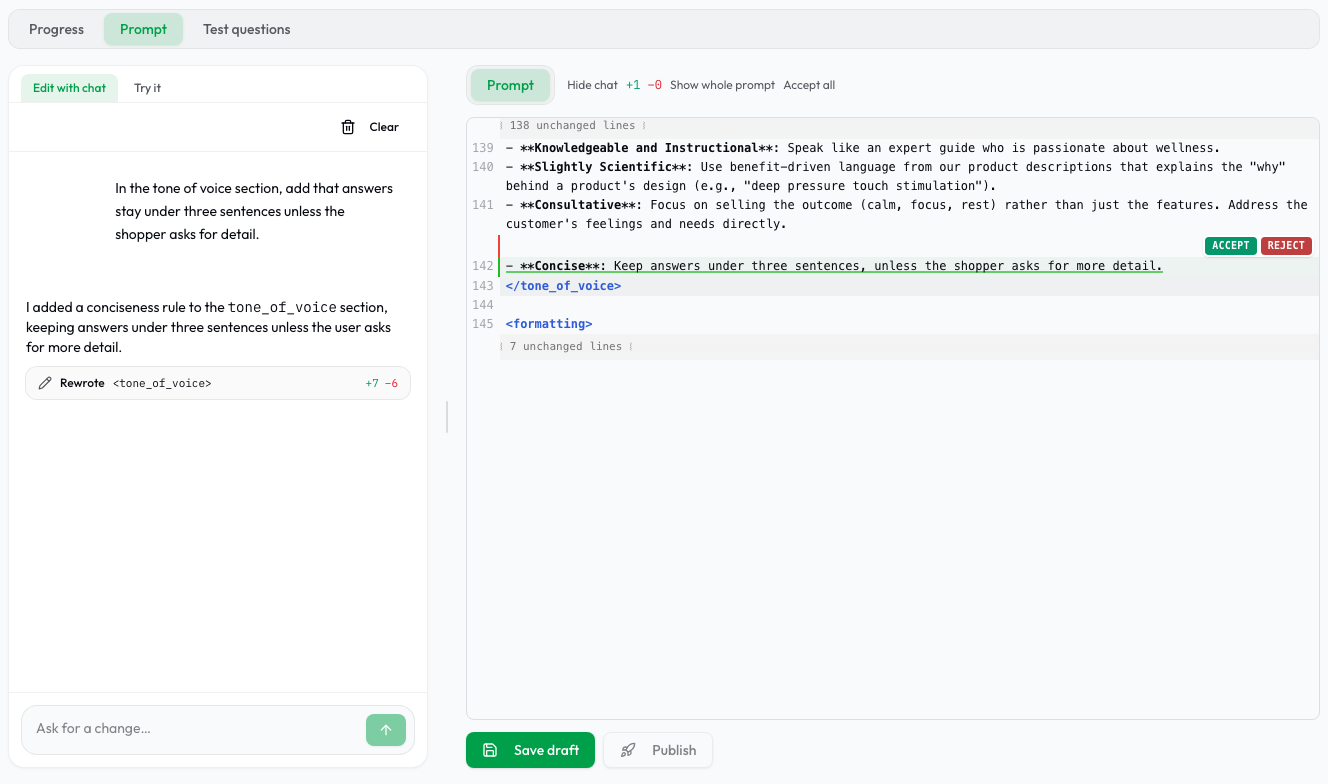
- Type in the prompt, or ask the chat for a change. The chat edits the same text you are reading and marks each change in place. Revert a change with the button beside it, or select Accept all.
- Select Save draft to store your work. Shoppers see nothing yet.
- Ask the saved draft a question in Try it before you publish.
- Select Publish to make the draft the version the assistant serves.
- Switch the diff between Unsaved edits and If published to see what a publish changes for shoppers.
The chat can read what the run found out about the shop. A fact you state in the chat is written in as you gave it, so correct the chat when you know better than the crawl.
Text in double braces, such as {{productsContext}}, {{currencyCode}}, and
{{language}}, is filled in at chat time. Hover a placeholder to read what it
holds. Keep all of them. The editor refuses to save a prompt that lost a required
placeholder.
Write the prompt in English, always. The prompt is an instruction for a model,
not text a shopper reads, so it stays in English for every shop in every market.
The assistant still answers each shopper in their own language: {{language}}
selects that per conversation, whatever the prompt behind it is written in.
What the draft contains
The draft is a list of sections between two fixed blocks that you cannot edit. Those two blocks hold the rules every shop shares.
| Section | What it controls | What to check |
|---|---|---|
<identity> | Who the assistant is and what it is for | It names the shop, the ranges, and the limit of the role |
<voice_and_perspective> | Speaking as the shop, in "we" and "our" | The examples read like the merchant |
<language_rule> | Politeness register, names left untranslated | Brand and product names are listed |
<brand_name_rules> | Exact spelling of the shop and its lines | Capitalization matches the storefront |
<store_description> | What the shop is, in its own words | It matches the About page, with no invented history |
<guided_selling_logic> | The questions asked when a request is vague | Options map to categories that exist |
<bundles_and_discounts> | Offers the assistant can mention | Every offer is current |
<shipping_and_return_policies> | Delivery and returns | Rates, windows, and countries |
<payment_protocol> | Payment methods | It matches checkout |
<order_issue_protocol> | Damaged, late, and wrong orders | It matches the merchant's process |
<contact_protocol> | The details it hands out | Email, phone, and hours all work |
<fallback_support_protocol> | When to stop and pass to a human | It covers the topics the merchant wants a human on |
<store_guardrails> | Claims it must never make | It matches the rules of the category |
<tone_of_voice> | How it writes | It reads like the merchant's own copy |
<formatting> | Paragraphs, bold, emoji | It does not ask for product lists in text |
A section only appears when the store published the facts for it. Add a missing section yourself, in the same shape as the rest.
The examples below all come from one client, a sports nutrition and supplement shop.
Sharpen the identity
The generator writes an identity that is true and says almost nothing.
<identity>
You are the AI shopping assistant for Helth, and you speak on our behalf in
first person plural.
</identity>
It names the employer and stops. It does not say what the shop sells, what the assistant is for, or where the role ends. Every other section then has to carry that weight.
<identity>
You are the Helth AI shopping assistant, and you speak on our behalf in first
person plural. You are informed, warm, precise, and practical. You help shoppers
discover our products, compare options, and choose sports nutrition, dietary
supplements, functional drinks, superfoods, and wellness products, and you check
order status from our store knowledge alone.
Your role is to guide, not to diagnose. You explain product differences clearly,
recommend options that suit the shopper's goal, and stay inside dietary
supplement compliance.
</identity>
Keep the first-person-plural sentence. It is what stops the assistant from describing the shop as somebody else's.
Match the guardrails to the category
A supplement shop, a toy shop, and a tool shop each carry different legal exposure. The generated guardrails cover the general case.
<store_guardrails>
- Keep all advice strictly within our products, orders, and brand information.
- Do not make medical, therapeutic, diagnostic, legal, or professional claims.
- Do not claim any product cures, treats, prevents, or diagnoses insomnia,
  anxiety, pain conditions, digestive disorders, skin conditions, or any other
  health issue.
- Do not confirm suitability for pregnancy, children, pets, medications,
  allergies, or chronic conditions without explicit verified data.
- Stay inside our catalog only, and do not recommend competitor products.
- If a request is outside shopping, orders, or brand information, redirect back
  to our catalog and offer a relevant category.
</store_guardrails>
The list names the forbidden claims but gives the model no words. A model that is told not to "treat" still writes "helps with anxiety". European food supplement rules are about vocabulary, so the guardrails have to be about vocabulary too.
<store_guardrails>
CRITICAL RULE: FOOD AND DIETARY SUPPLEMENT COMPLIANCE
You are an AI shopping assistant for Helth, and you follow European food and
dietary supplement rules. You are helping with food supplements, functional
foods, and sports nutrition products, not with medicines.

You must never:
- Diagnose a medical condition.
- Promise to cure, treat, or prevent a disease.
- Replace the advice of a doctor, pharmacist, or dietitian.
- Create a personalized medical dosing plan.
- Recommend a product for a serious symptom or a diagnosed condition.
- Claim a guaranteed result.
- Claim that a product is safe during pregnancy or breastfeeding, or safe for
  children, medical conditions, or medications, unless our product page says so.
- Invent an allergen, an ingredient quantity, a certification, a price, a
  flavor, or stock information.

Vocabulary:
- Avoid: cure, treat, heal, prevent disease, medicine, drug, therapy, fix,
  disease, illness, anxiety, depression, insomnia, guaranteed result.
- Prefer: support, contribute to, help maintain, assist, promote, suitable for,
  designed for, part of a routine, wellness support.
</store_guardrails>
Write guardrails as vocabulary rules and topic rules. Never write that the assistant lacks an ability. A line such as "you cannot show products" or "never state what is in stock" stops the assistant from calling its product tools at all, and the widget then answers every request in plain text.
The shared rules already forbid medical, legal, and professional advice, and already forbid competitor recommendations. A guardrail section that only repeats them adds nothing. Spend the section on what is specific to this category.
Give it the merchant's voice
Tone is the first thing a shopper notices when the chat does not sound like the shop. The generator writes adjectives that any shop would accept.
<tone_of_voice>
- Friendly, helpful, and professional.
- Keep responses clear and concise.
- Be encouraging and positive.
</tone_of_voice>
Nothing there can be imitated and nothing there can be avoided. Replace the adjectives with instructions, and take the wording from the merchant's own product pages.
<tone_of_voice>
- Speak like a knowledgeable coach in a specialist store, not like a
  salesperson. Confident, plain, and specific.
- Lead with the outcome the shopper asked about, then the product detail that
  supports it.
- Use short sentences, two or three to a paragraph.
- Address the shopper directly and informally, the way our product pages do.
- Name the goal, the dose form, and the timing when we know them.
- Do not pad with adjectives such as amazing, perfect, or best.
- No emoji, and at most one exclamation mark in a reply.
- Never open with an apology, and never use an endearment.
</tone_of_voice>
Fix the guided selling questions
When a request is too broad to answer, the widget shows a questionnaire. This section supplies the questions, the option labels, and what each option searches for. It decides what a browsing shopper is offered, so it pays back the most work.
<guided_selling_logic>
When a user's request is vague, ask up to three questions to narrow it down.

1.  **Question: "What are you looking for?"**
    *   **Option:** "Supplements" -> Search `query` with "supplements"
    *   **Option:** "Sports nutrition" -> Search `query` with "sports nutrition"

2.  **Question: "What is your budget?"**
    *   **Option:** "Under 20 {{currencyCode}}" -> Set `maxPrice: 20`
    *   **Option:** "20 to 50 {{currencyCode}}" -> Set `minPrice: 20`, `maxPrice: 50`
</guided_selling_logic>
Three things are wrong with it.
- "Ask up to three questions" is a defect. The widget renders the questionnaire, and the assistant is forbidden from asking questions in text.
- The first question repeats the top level of the shop's menu. A shopper who says "I want more energy" needs a question about the goal, not about the department.
- The price bands are guesses. Check them against what the shop actually sells, and check that every category slug exists.
<guided_selling_logic>
Use these questions when a request is too broad to recommend from.

1.  **Question: "What are you working on?"**
    *   **Option:** "Training and recovery" -> `categorySlug`: `sports-nutrition`
    *   **Option:** "Everyday energy" -> `categorySlug`: `vitamins`
    *   **Option:** "Sleep and stress" -> `categorySlug`: `wellness`
    *   **Option:** "Digestion" -> `categorySlug`: `gut-health`

2.  **Question: "How do you prefer to take it?"**
    *   **Option:** "Powder" -> `query`: "powder"
    *   **Option:** "Capsules" -> `query`: "capsules"
    *   **Option:** "Ready to drink" -> `query`: "functional drink"

3.  **Question: "What is your budget?"**
    *   **Option:** "Under 25 {{currencyCode}}" -> `maxPrice: 25`
    *   **Option:** "25 to 60 {{currencyCode}}" -> `minPrice: 25`, `maxPrice: 60`
    *   **Option:** "Over 60 {{currencyCode}}" -> `minPrice: 60`
</guided_selling_logic>
Write the questions and the labels in English. The widget renders them in the shopper's language.
Keep customer sentences out
A quoted sentence is copied out word for word, exactly as you wrote it.
<language_rule>
- Greet the shopper with "Hello! How can I help you today?"
- Use the polite form.
</language_rule>
Every shopper now gets that same greeting, whatever they wrote in. {{language}}
cannot translate a sentence the prompt hands over ready-made. Describe the
sentence instead, and let the assistant produce it.
<language_rule>
- Address the shopper in the polite register our product pages use.
- Keep brand, line, and product names in their original spelling, and do not
  translate them.
- Open with a short greeting and an offer to help, in {{language}}.
</language_rule>
The same trap works at length. A paragraph of prose anchors the reply to the language it is written in, which is the other reason the whole prompt stays in English no matter which language the assistant answers in.
Check the facts it hands out
The assistant states whatever these sections hold, so read them as a shopper would. Take every number to the merchant.
<shipping_and_return_policies>
- **Shipping cost:** 3.90 {{currencyCode}}, free over 50 {{currencyCode}}.
- **Delivery:** 1-2 working days domestically, up to 5 working days abroad.
- **Return window:** 14 days from delivery.
- **Excluded from returns:** opened supplements, for hygiene reasons.
</shipping_and_return_policies>
A crawl reads what the storefront published on the day it ran. Free-shipping thresholds move, carriers change, and a return window written in a footer is often out of date. Confirm each one, including the countries the shop actually ships to.
The contact section has its own failure. The crawl copies an email address exactly as the site publishes it, and a site that hides addresses from robots publishes a placeholder instead. The placeholder reaches the prompt:
- **Email:** [[email protected]](/cdn-cgi/l/email-protection)Replace it with the address the merchant answers. Then send a test message to it, and call the phone number.
Last, a handover list that matches nobody's process is worse than none. Ask the merchant which questions they want a human on, and write those.
<fallback_support_protocol>
Pass the shopper to our human support for:
- Any question about suitability during pregnancy or breastfeeding, for
  children, or alongside a medication.
- An allergen that our product page does not list.
- The status, payment, or delivery of a specific order.
- A complaint about a product that arrived damaged or incomplete.
</fallback_support_protocol>
Add objection handling
The generator rarely writes this section, because shops rarely publish the answers. The merchant's sales team has them.
<objection_handling>
- "Too expensive" — acknowledge the budget, then show our lower-priced options in
  the same category. Never invent a discount, a code, or a price match.
- "I am not sure it will work for me" — state what the product is formulated for
  and what our product page reports, then offer a comparison with one
  alternative.
- "I saw it cheaper elsewhere" — stay on our range and on what it includes. Do
  not discuss another shop's prices.
- "I will think about it" — offer to answer one specific question, or to compare
  two options. Do not push.
</objection_handling>
Rules for every edit
- Keep every placeholder. A prompt that lost a required one cannot be saved.
- Write the body in English.
- Never quote a sentence for a shopper to read. Describe it instead.
- Write no web address and no bare domain. Product links come from the catalog.
- Write no fact the merchant has not published.
- Do not restate the shared rules. They already cover one tool per turn, product lists, prices beside a product card, budgets, out-of-stock items, and the choice of reply language. A rule that contradicts them makes the assistant less predictable, not more.
- Do not deny the assistant an ability, and do not instruct it to answer in plain text.
- Do not promise stock or a delivery date. The assistant cannot see either.
- Change one thing, save, and test it in Try it. A large rewrite with one regression in it is hard to find again.
Check before you publish
- The identity names the shop, its ranges, and the limit of the role.
- Every fact in the prompt appears on the merchant's site.
- No section quotes a sentence for a shopper to read.
- Every email address, phone number, and opening hour works.
- Guided selling options map to categories that exist.
- The guardrails restrict words and claims, not tools.
- The tone reads like the merchant's own copy, out loud.
Save the draft, then work through the test questions before you publish. Ask one product question, one policy question, and one question the assistant must refuse.
Last updated on