 ShopAssist
Enhance ShopAssist
Put question pills and Compare into the storefront itself.
The chat widget works on its own. These two features move ShopAssist into the storefront itself: question pills under a product, and a Compare button that opens the chat on a side-by-side comparison.
Both are optional, and both stay off until you add them. Add them once the shop is live. Read this page first, then follow the page for the client's platform.
Before you start
Switch both on for the client first. On the client card, open the More actions menu (⋯), select Features, and turn on FAQ and Product comparison. Until they are on, no pills and no Compare button appear on any platform, whatever the plugin or theme setting says.
The pills render the questions generated for that product in the client dashboard. A product with no generated questions, or with its pills switched off, renders nothing at all: no heading and no empty container. Generate the questions first.
Neither feature works on a shop that is not live, or while the widget is switched off in the client dashboard.
Check the storefront
Open the live storefront in a private window and confirm that:
- A product with pills enabled shows them where you placed them.
- Selecting a pill opens the chat with that question asked.
- The Compare button appears, if you added it.
- Compare on a product page opens the panel of similar products, and picking one opens the comparison.
- In a listing, where the platform has it, Compare on two cards opens the comparison.
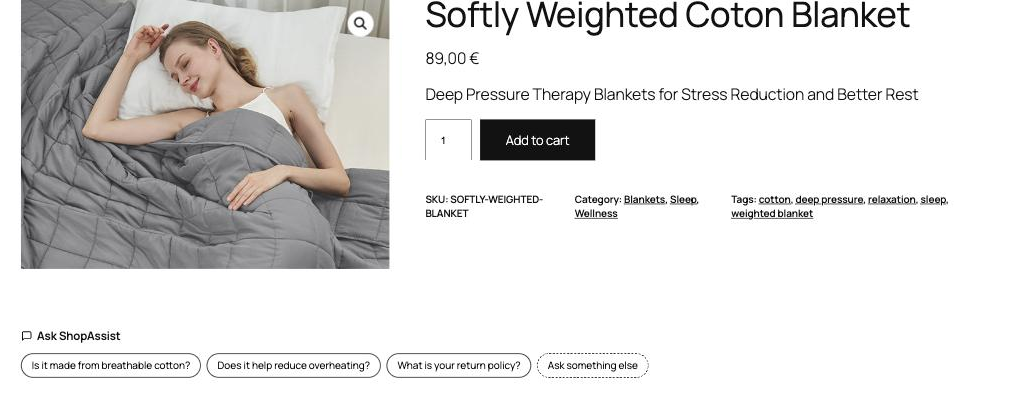
On WooCommerce the plugin caches the pills for five minutes, so a change in the dashboard shows up after that. On Shopify, Magento and custom storefronts the pills are fetched fresh on every page load.
Troubleshooting
These apply on every platform. Each platform page lists its own.
| Symptom | Cause | Resolution |
|---|---|---|
| Pills do not appear | FAQ off in Features, no questions generated, pills disabled, wrong language, widget disabled, or the shop is not live | Work through each in the dashboard |
| A pill returns different wording | A stored answer is served word for word only when the pill starts the conversation | Reload the product page and select the pill first |
| No Compare button anywhere | Compare is not switched on for the shop | Turn on Product comparison in Features on the client card |
For anything else, email support@getshopassist.com with the shop domain and the platform.
Last updated on